
How to Fix Magento Social Media Previews with Open Graph Images
Learn how to use the Mosaicora Open Graph module to publish reliable Magento metadata, optional generated social images, and local-image fallbacks across product, category, CMS, and home pages.
You will learn
- Configure a store-view-safe metadata baseline without editing storefront templates
- Choose between Mosaicora-generated previews and the standalone local-image fallback
- Map page context, verify output, and manage duplicate social tags safely
The direct answer
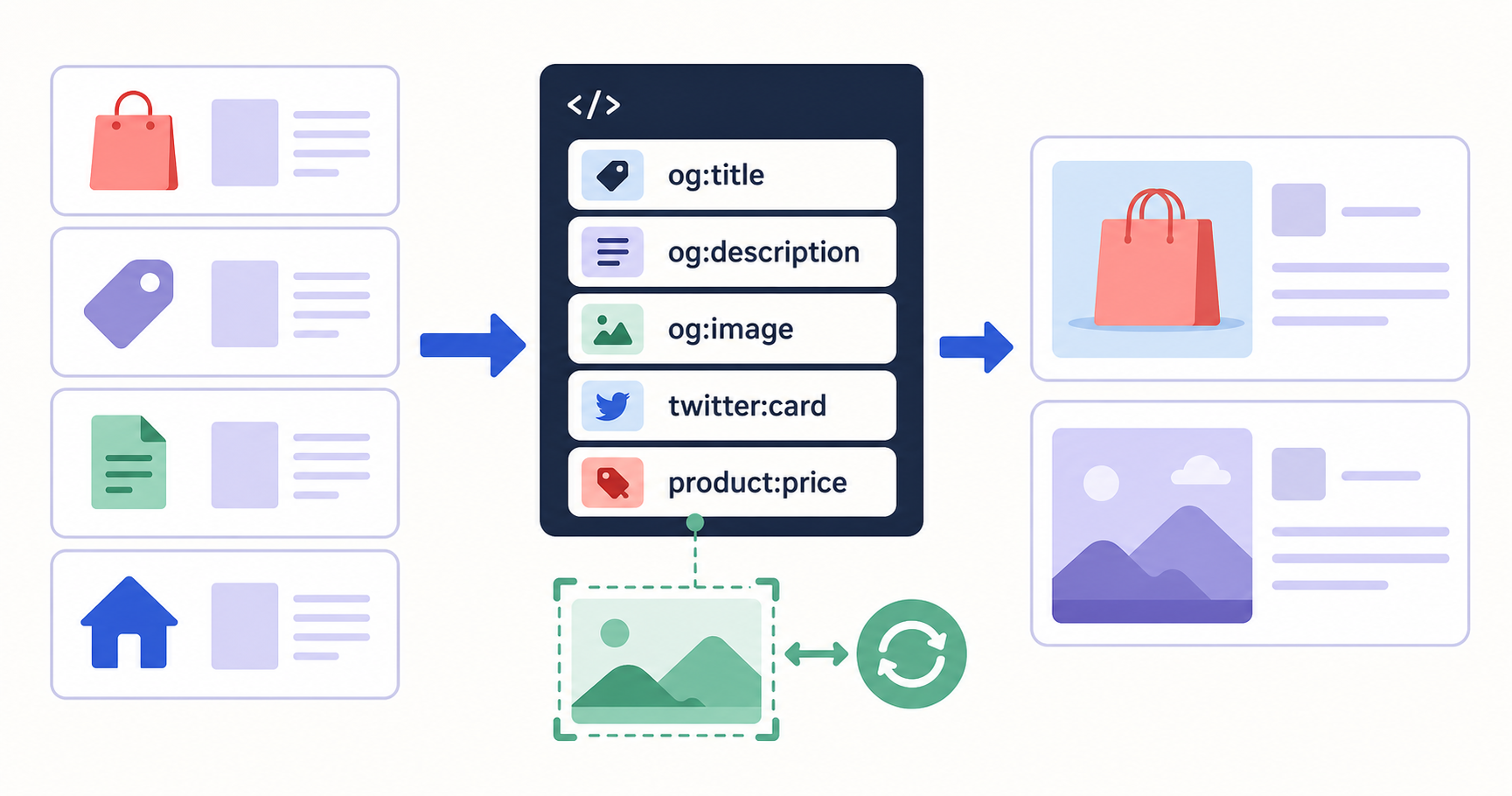
The Mosaicora Open Graph module gives Magento, Mage-OS, and Adobe Commerce storefronts one store-scoped source for product, category, CMS, and home-page social metadata. It can optionally replace local social images with Mosaicora CDN previews generated from page context and JSON-LD hints, while preserving a configurable local-media fallback with cached 1200 by 630 images when Mosaicora is not enabled.
What the module covers on a Magento storefront
A share preview should describe the page a shopper will reach, not a generic storefront. The module adds Open Graph metadata during layout generation for product pages, category pages, CMS pages, and the home page. That gives marketing and development teams one place to control the social contract across the page types that customers most often share.
- Product pages resolve metadata from the active product.
- Category pages resolve metadata from the active category.
- CMS pages resolve metadata from the page rendered by Magento.
- The home page uses the active CMS home page when one exists, then falls back to the configured site name and default image.
Open source and available on GitHub
The module is open source under the GPL-3.0-or-later license. Review the source, release notes, and contribution guidance in its public repository.
Install and enable it in the normal Magento workflow
The package supports Magento 2, Mage-OS, and Adobe Commerce storefronts running PHP 8.1 through 8.5. Install it from the Magento project root, then run your usual upgrade and cache process. Keep Composer dependencies at the project level rather than creating a nested vendor directory inside a mounted module.
composer require mosaicora/module-opengraph

bin/magento module:enable Mosaicora_OpenGraph
bin/magento setup:upgrade
bin/magento cache:flush config layout block_html eav full_page config_webserviceSet the store-view metadata baseline and content sources
Configuration lives under Stores, Configuration, Mosaicora, Open Graph. Where Magento allows it, settings are store-scoped, so each store view can select its own site name, social-card behavior, and content fields. Set the Open Graph basics first, then choose the product, category, and CMS title and description sources that match the attributes your team maintains.
Baseline settings to decide with marketing and development
- Enable Open Graph tags and set the social site name for each store view.
- Enable Twitter Card tags when the storefront should emit the equivalent twitter-prefixed fields.
- Choose a Twitter Card type that matches the intended image treatment.
- Select content-source fields with dependable values before relying on generated or fallback images.
- Leave competing-tag removal off until you have identified every theme or extension that also publishes social metadata.
Choose Mosaicora previews or a local image fallback
Mosaicora image generation is optional. When it is enabled for a store view, the module replaces og:image and twitter:image with a Mosaicora CDN preview generated from page context. Add the public Site ID for the matching Mosaicora site, then use the advanced mappings to pass the product, category, and CMS values that should inform the generated image. When it is disabled, the module keeps the local Magento image workflow.
Mosaicora enabled
Generated previews from page context
Use a public Site ID and semantic mappings to replace the social image with a CDN preview tailored to the resolved page metadata.
Mosaicora disabled
A local Magento image fallback
Use the configured product image source, a default image, and local image optimization without connecting a Mosaicora account.
Choose one authority for overlapping social tags
A Magento theme or another extension may already write Open Graph or Twitter Card tags. The cleanest setup is to disable the other output so each metadata key has one owner. If that is not possible, the module can remove competing Open Graph, product, and enabled Twitter Card tags for keys it generates. The setting is off by default to preserve compatibility.
A safe duplicate-tag rollout
- Inspect initial storefront HTML for existing og, product, and twitter meta tags.
- Disable duplicate output at the theme or extension when that option exists.
- Enable Remove Competing Social Tags only when the remaining source cannot be disabled.
- Recheck product, category, CMS, and home pages for one intentional value per key.
Use resolved metadata in custom frontends
The module exposes the same normalized metadata through anonymous, read-only REST endpoints for product, category, CMS, and home pages. Its GraphQL fields appear on Magento's native storefront types, including ProductInterface, CategoryInterface, CmsPage, and StoreConfig. Both surfaces return the resolved tag list, so a headless storefront, mobile application, or other custom frontend can use the same metadata as the Magento storefront.
query ProductOpenGraph($sku: String!) {
  products(filter: { sku: { eq: $sku } }) {
    items {
      sku
      open_graph {
        enabled
        tags {
          name
          content
        }
      }
    }
  }
}Launch with a small, repeatable quality check
Before a campaign or catalog release
- Open a representative product, category, CMS, and home page for every important store view.
- Confirm the canonical URL, title, description, image, width, and height values are accurate.
- Check product price, currency, and availability metadata when product previews use those fields.
- Confirm Twitter Card tags appear only when the setting is enabled and match the resolved Open Graph values.
- Use a public inspector to validate the live HTML before a social post or paid campaign goes out.
Check live example pages
Open a ready-made checker result to see the metadata the demo store publishes for each page type.
This workflow keeps the technical metadata and the marketing message aligned. Developers get a predictable resolution path and inspectable output. Marketers get accurate, page-specific previews without needing a separate set of storefront templates for every campaign.
Request a Magento preview audit
We will review three representative public URLs, identify social-preview metadata problems, and reply asynchronously with one practical setup proposal.
Prefer to continue on your own? Open the free checker