
E-commerce
Product and category pages
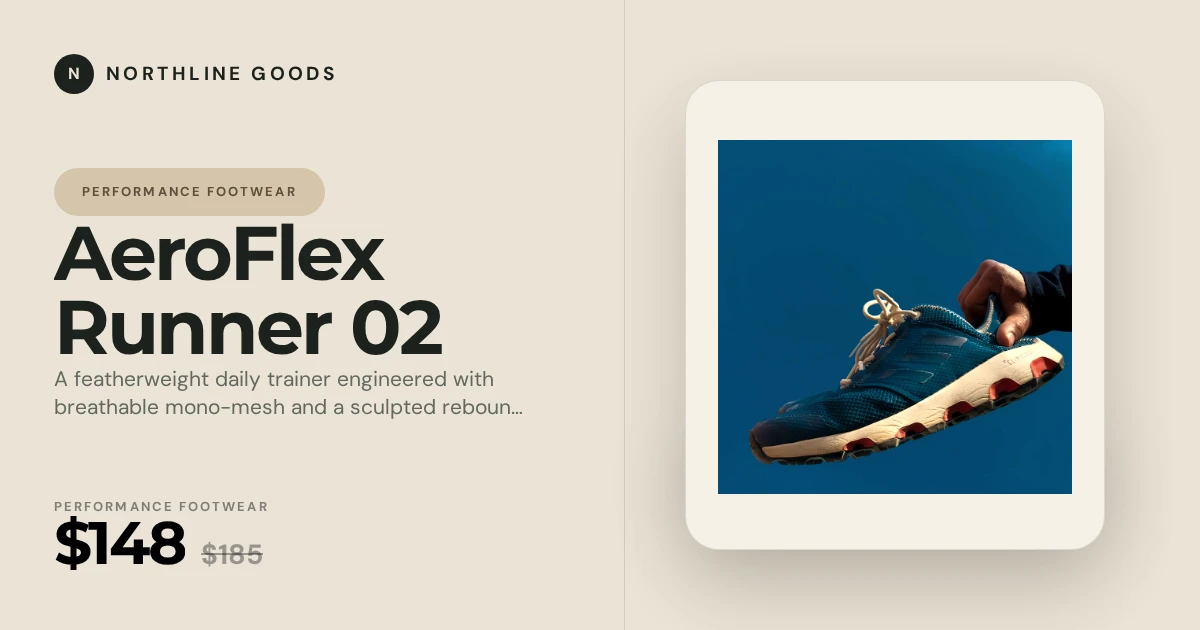
Turn product titles, prices, imagery, and store branding into polished social previews built for product discovery.
Dynamic social previews
Mosaicora turns page titles, descriptions, and visuals into branded Open Graph images automatically, so each shared URL explains the exact page behind the click.
A single default image cannot describe a changing catalog, newsroom, docs site, or campaign library. Shared links start to look generic, stale, or unclear.
Mosaicora combines page data with reusable templates, then creates polished previews that keep your brand consistent while the content changes.
Use a framework integration, an API workflow, or the automatic JavaScript script for sites where you can add code to the document head.
Use one visual system across commerce, publishing, SaaS, and business pages while each URL gets its own context.
Template examples
Visual examples for pages that change often.
Turn product titles, prices, imagery, and store branding into polished social previews built for product discovery.

Present headlines, publication branding, authors, and story imagery in a format designed for fast-moving feeds.

Give every article a recognizable, readable preview using its title, author, category, and featured image.

Show product interfaces, value propositions, and launch messages in reusable previews that match your software brand.

Build trust with clean previews for company pages, services, reports, events, and professional announcements.

Help technical roles stand out with previews that clearly communicate the position, company, location, and key details.
Dynamic OG images use the title, description, brand, and visual content from each URL instead of relying on one generic image. Mosaicora keeps the design consistent while changing the details that matter for each page.
Give product pages, release notes, articles, and public profiles an image that reflects their actual content.
Keep typography, colors, logos, and layout consistent while the content changes from page to page.
Reference a stable image URL in your Open Graph metadata without adding image rendering work to each request.
Reuse the same Mosaicora system across high-volume page types, then tailor each template to the data visitors already expect.
E-commerce
Show product names, collection context, prices or offers, and store branding instead of one generic storefront image.
View templatesNews and blogs
Give every article a recognizable preview while keeping the publication layout consistent across fast-moving editorial pages.
View templatesSaaS
Make feature pages, docs, release notes, changelogs, and integrations explain themselves when links move through feeds and chats.
View templatesMarketplaces
Turn repeated page data into previews that identify the exact item, creator, place, or collection being shared.
View templatesBusiness
Build trust for services, reports, announcements, and campaign pages without asking a designer to export every preview.
View templatesAutomatic setup
Add one hosted script and your public site ID. Mosaicora uses each page's canonical URL to add matching Open Graph and Twitter image tags automatically in the browser.
Some social crawlers only read metadata from the initial HTML response. For those platforms, use a server-rendered integration such as Next.js or the framework-agnostic npm package.
<script
  src="https://static.mosaicora.io/js/og-image.min.js"
  data-og-site-id="321cac22d2103fb1660c50bd"
></script>Step 1
Pick a layout for articles, products, SaaS pages, or another content type, then set the brand style once.
Step 2
Map each page title, description, image, and brand field, or start with URL-based automatic setup.
Step 3
Place the Mosaicora image URL in og:image and twitter:image using the metadata system your site already uses.
Step 4
Preview the result before sharing, then regenerate the image whenever important public content changes.
<meta property="og:image" content="https://cdn.mosaicora.io/your-page-image.jpg" />
<meta name="twitter:card" content="summary_large_image" />
<meta name="twitter:image" content="https://cdn.mosaicora.io/your-page-image.jpg" />Use the connected resources already available on Mosaicora to choose a template, install an integration, and validate the result.
Browse reusable designs for products, articles, news, SaaS, business, and more.
Add automatic Mosaicora tags to any compatible website with one hosted script.
Improve product, category, CMS, and home page previews on Magento storefronts.
Inspect the title, description, image, and preview metadata already published.
Compare manual fallback images with reusable dynamic preview workflows.
Use a repeatable validation flow before publishing important pages.
Open the dashboard to create your free workspace and start improving your link previews.